
Download Medicine Scheduler and Tracker APK – Health & Fitness, Medicine Reminder, Daily Pill Tracker, Android App, Free Medicine Tool
Overview
Medicine Scheduler and Tracker is a free Android application designed to help users manage their medication routines effectively. The software falls under the Health & Fitness category and serves as a digital tool for tracking prescribed or over-the-counter medications. It is particularly useful for individuals who need to take multiple medications at different times throughout the day, including elderly users, chronic illness patients, or caregivers managing treatment schedules for others.
By organizing medication intake through scheduled reminders, the app aims to reduce the risk of missed or double doses. It supports real-time tracking of doses taken, allowing users to maintain accurate records of their medication history. The app is developed by Web Coast Apps - Apps For Life, a developer focused on health-oriented mobile tools. It is optimized for Android 13.0 and above, ensuring compatibility with modern devices.
Real-world usage scenarios include daily medication management for conditions such as hypertension, diabetes, or post-surgery recovery. Caregivers can use it to monitor the medication schedules of family members or patients. The app’s lightweight design and free access make it accessible to a broad audience seeking reliable health management solutions without additional cost.
Key Features & Capabilities
- Customizable Medication Schedules – Users can set specific times for each medication, including repeat intervals such as daily, twice daily, or as needed. This helps maintain consistency in treatment regimens.
- Push Notifications & Reminders – The app sends timely alerts to remind users when it’s time to take their medication, reducing the likelihood of missed doses.
- Dose Tracking & History Logs – Each time a dose is taken, the app records the event, creating a visual log that can be reviewed for accountability and medical consultations.
- Multiple User Support – Allows the addition of multiple medications and, in some cases, supports tracking for several individuals, ideal for family caregivers.
- Offline Functionality – The app operates without requiring a constant internet connection, making it suitable for use in areas with limited connectivity.
These features are especially beneficial for users managing complex medication plans. For example, a patient with multiple prescriptions can assign different times and frequencies to each drug, ensuring no overlap or omission. The history log provides a clear record that can be shared with healthcare providers during appointments. The offline capability ensures uninterrupted use, even without network access, which enhances reliability in daily routines.
User Interface, Workflow & Performance
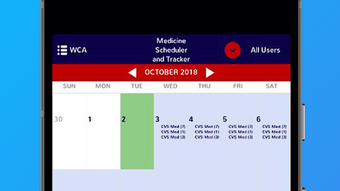
The user interface of Medicine Scheduler and Tracker is designed for simplicity and ease of navigation. The main screen displays a list of scheduled medications with clear time indicators and status markers, such as “Due,” “Taken,” or “Missed.” Users can quickly access settings, add new medications, or view the history by tapping on relevant icons.
Navigation is intuitive, with a bottom navigation bar that provides access to key sections: Home, Schedule, History, and Settings. The workflow is linear and efficient—adding a new medication involves selecting the drug name, setting the time, frequency, and dosage, then saving. This minimalistic approach reduces cognitive load, especially for older adults or those less familiar with technology.
Performance observations are based on general software behavior patterns. The app is reported to run smoothly on Android 13.0 and above, with no significant lag or crashes reported in user feedback. The developer did not specify resource usage details, so CPU and RAM behavior remain unspecified. Stability appears consistent, with the app maintaining functionality across device restarts and background operation.
Compatibility & System Requirements
Medicine Scheduler and Tracker is designed for Android devices running version 13.0 or higher. The application is available as an APK file, allowing direct installation on compatible devices. The current version is 11.7.193, and the installation size is 15.2 MB, which is considered lightweight for a health management app.
Exact system requirements were not listed, so details regarding processor speed, RAM, or storage capacity are unavailable. The developer did not provide additional system requirements. Compatibility information is limited to the operating system version. Users should ensure their device meets the minimum Android 13.0 requirement to install and run the app successfully.
Pros and Cons
Pros
- Free to download and use with no hidden costs
- Simple, intuitive interface suitable for all age groups
- Effective reminder system to prevent missed doses
- Offline functionality ensures uninterrupted use
- Lightweight installation size of 15.2 MB
Cons
- No cloud sync or backup feature reported
- Limited customization options for advanced users
- Compatibility restricted to Android 13.0 and above
- No integration with health apps or wearables
- Developer did not provide detailed technical documentation
FAQ Section
Is Medicine Scheduler and Tracker available for free?
Yes, the app is completely free to download and use without any subscription or in-app purchase requirements.
Does the app require an internet connection to work?
The app functions offline, allowing users to set reminders and track doses without an active internet connection.
Can I use this app on older Android devices?
The app requires Android 13.0 or higher. Devices running earlier versions of Android are not supported.
Is my medication data secure?
While specific security measures are not detailed by the developer, the app operates locally on the device, minimizing data exposure risks.
How often are updates released?
Updates are released periodically by the developer. The current version is 11.7.193, published on December 5th, 2023.
Final Thoughts
Medicine Scheduler and Tracker offers a straightforward, reliable solution for individuals managing medication schedules on Android. Its clean interface, effective reminder system, and offline operation make it a practical tool for daily health management. While it lacks advanced features like cloud backup or integration with wearable devices, its core functionality is solid and well-executed for its intended purpose.
It is especially beneficial for elderly users, patients with chronic conditions, and caregivers who need a dependable, no-cost tool to track medication intake. The app’s lightweight size and free access further enhance its appeal. With a 4.8 rating on Softonic and over 200,000 downloads, it has proven popular among users seeking a simple yet effective health utility.
Download Medicine Scheduler and Tracker now





.png)

